
Writing documentation tests by hand is time-consuming. For a small docs site with a handful of procedures, it’s manageable. For a site with hundreds of how-to guides across multiple products and versions, it doesn’t scale. Every new guide needs tests, every product update needs test updates, and the backlog of untested docs keeps growing.
But what if the same LLMs that can read and summarize documentation could also write the tests for it?
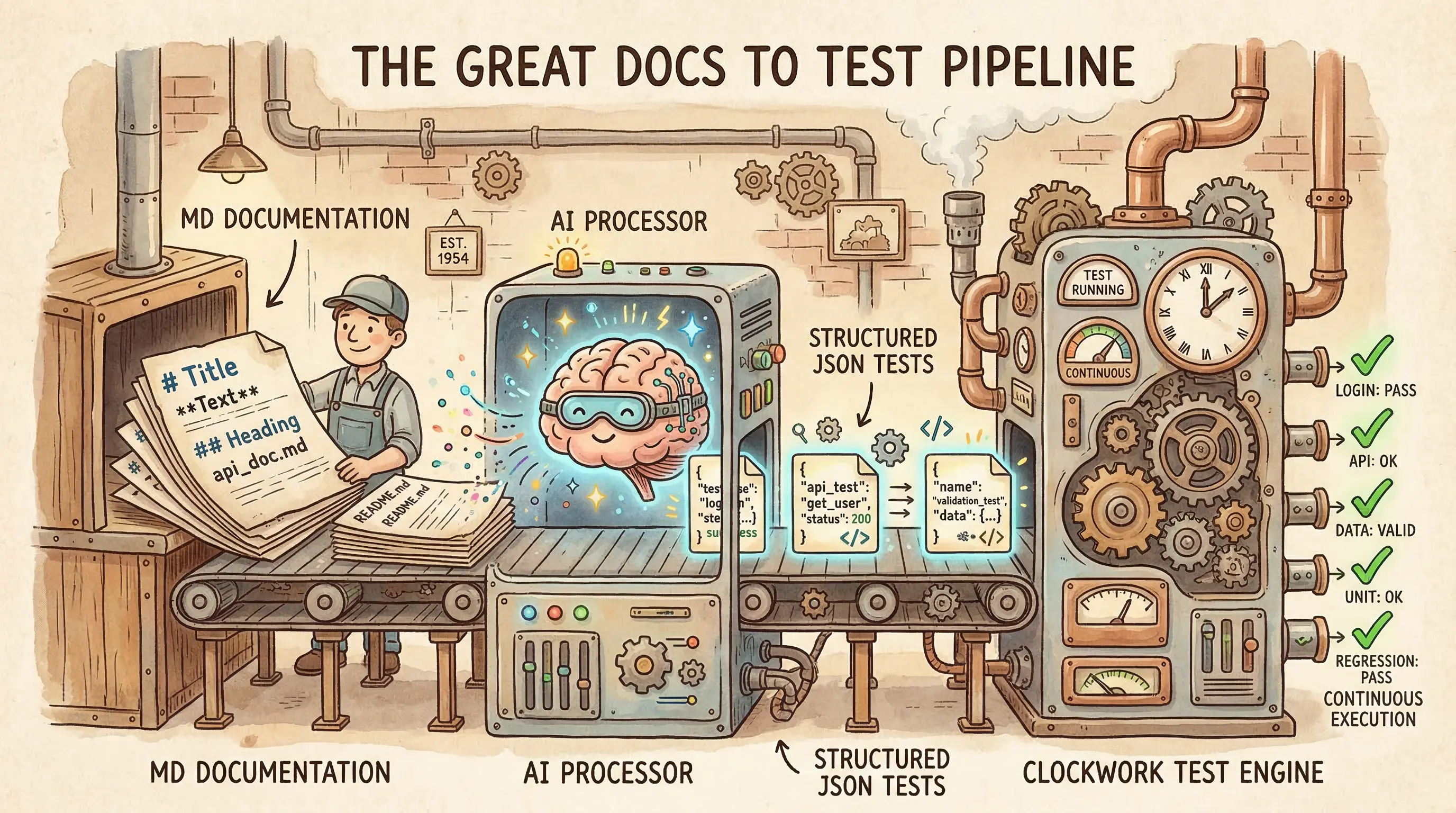
That’s the idea behind AI-assisted test generation: use an LLM to convert documented procedures into executable test specifications, have a human review the output, and then run those tests deterministically from that point on. You pay the AI cost once during generation. After that, execution is deterministic. No LLM inference, no variability, no per-run API costs.
Generate once, run forever
Note where the AI sits in the workflow. The LLM is the author of the test code, not the runtime. It reads a how-to guide, interprets the steps, and produces a structured test specification. A human reviews that spec for correctness. Then a deterministic test runner executes it—no LLM involved at runtime, no variability between runs, no API costs per execution.
This is different from probabilistic testing, where an LLM evaluates docs at runtime by interpreting content and judging quality on each pass. Probabilistic approaches have their place (I cover them in Docs as Tests & AI), but they introduce variability: the same input can produce different results across runs, and you’re paying for LLM inference every time. AI-assisted test generation avoids both issues by confining the AI to a one-time generation step.
The result is a test suite that behaves exactly like hand-written tests (deterministic, repeatable, and cheaper to run) but was created in a fraction of the time.
How it works in practice
Doc Detective’s agent tools implement this pattern as a set of agent skills. The doc-detective-test skill defines a workflow that converts documentation procedures into executable test specifications:
- Parse — Read a documentation file and identify step-by-step procedures
- Generate — Convert each procedure into a structured test specification
- Validate — Check that the generated spec is structurally correct (mandatory gate—the process stops here if validation fails)
- Execute — Run the tests against the actual product
- Analyze — Report results with failures mapped back to documentation sections
- Fix — Optionally iterate on failing tests with confidence-based suggestions
Here’s what that looks like with a concrete example. Say you have a getting-started guide:
## Create an Account

1. Navigate to https://example.com/signup
2. Enter your email address
3. Enter a password
4. Click "Create Account"
5. Verify you see the Dashboard
The LLM reads those steps and generates a Doc Detective test specification:
{
  "tests": [
    {
      "testId": "create-account",
      "steps": [
        { "goTo": "https://example.com/signup" },
        { "type": { "keys": "[email protected]", "selector": "#email" } },
        { "type": { "keys": "SecurePass123!", "selector": "#password" } },
        { "click": "Create Account" },
        { "find": "Dashboard" }
      ]
    }
  ]
}
Each documentation step maps to a test action: navigation becomes goTo, text entry becomes type, interaction becomes click, and visual verification becomes find. The test runner (Doc Detective, in this case) executes these actions in a real browser and reports whether each step succeeded.
A critical middle step—spec validation—checks the generated spec before any test runs. The validator confirms that the tests array is well-formed, that each step contains exactly one recognized action, and that action parameters match expected types. This catches the most common LLM generation errors (hallucinated action names, malformed parameters, missing required fields) before they waste execution time.
The human in the loop
AI-generated tests aren’t automatically correct. The LLM may interpret ambiguous documentation in unexpected ways, choose the wrong selector for an element, or miss context that isn’t explicitly stated in the docs.
That’s why human review is a required step, not an optional one. After generation, a person should check:
- Action mapping — Did the LLM correctly interpret each documentation step? A step that says “select your region” might map to a dropdown select, a radio button click, or a text input depending on the UI.
- Selectors and identifiers — When the LLM couldn’t use plain text matching (like
{ "click": "Submit" }), did it choose reasonable selectors that match your product? CSS selectors are brittle and should be a last resort. - Missing steps — Did the LLM capture implicit steps that the documentation assumes? Some guides assume the user is already signed in or has already configured a prerequisite.
- Test data — Are the test values reasonable? Email addresses, passwords, and other inputs should be appropriate for a test environment, and any secrets should be stored as environment variables.
The doc-detective-test skill includes a confidence scoring system for its fix loop: when a test fails and the agent proposes a fix, it assigns a confidence score (0–100). Fixes above a configurable threshold are applied automatically, while fixes below it are shown to the user for approval. This applies to initial generation, too. Outputs are drafts that needs review, not a finished product.
This is where the economics work out. Reviewing a test spec generated from a clean procedure takes minutes. Writing one from scratch takes significantly longer, especially for complex multi-step procedures. Multiply that across hundreds of guides, and the time savings are substantial.
Bootstrapping test coverage
For teams with an existing docs site and zero test coverage, the doc-detective-init skill provides a bootstrapping workflow:
- Detect — Scan the repository for documentation files (Markdown, MDX, AsciiDoc, reStructuredText, HTML, DITA)
- Configure — Generate a minimal Doc Detective configuration
- Generate — Create test specifications for all identified procedures
- Execute — Run all generated tests
- Fix — Iterate on failures with confidence-based suggestions
This takes a repository with no test infrastructure and produces a working test suite. The tests live alongside the docs in version control, run through the same CI pipelines, and produce the same pass/fail signals as hand-written tests.
The approach isn’t all-or-nothing. You can start with one guide, review the generated tests, and expand from there. Each generated spec is an independent file that can be reviewed, edited, and committed on its own timeline.
Injecting tests for maintainability
So now you have a pile of generated test specs—separate JSON files sitting alongside your docs. That works, but it creates a maintenance problem I wrote about in Docs as Tests because when tests live in separate files, they drift from the documentation they validate. Someone updates a procedure, forgets to update the corresponding spec, and now your tests are checking stale claims. The more specs you generate, the faster this drift compounds.
The solution is to take verified test specs and embedding them as inline comments directly in your documentation source files. The doc-detective-inject skill handles this. After tests pass validation and execution, it matches each test step to the documentation step it validates and inserts it as a comment:
## Create an Account

<!-- test {"testId":"create-account", "detectSteps": false} -->
1. Navigate to https://example.com/signup
<!-- step {"goTo":"https://example.com/signup"} -->
2. Enter your email address
<!-- step {"type":{"keys":"[email protected]","selector":"#email"}} -->
3. Enter a password
<!-- step {"type":{"keys":"SecurePass123!","selector":"#password"}} -->
4. Click "Create Account"
<!-- step {"click":"Create Account"} -->
5. Verify you see the Dashboard
<!-- step {"find":"Dashboard"} -->
<!-- test end -->
Readers see normal documentation (the comments don’t render), but people or agents editing the file see the test assertions right next to the steps they check. When someone rewrites step 4 to say “Click Sign Up” instead of “Click Create Account,” the inline test comment is staring right at them. The coupling is proximity-based, not just conceptual.
This matters more at scale. A team with three hundred guides probably can’t keep separate docs and tssts in sync without heavy automation or process, and process is fragile. Inline tests eliminate the synchronization problem entirely because the test is the documentation file. One file to update, one file to review, one file to commit. Tests detected directly from documentation syntax is even better, but that’s a different discussion.
Injection also changes what CI catches. With separate spec files, a renamed button breaks the test, and the failure points to the spec file. The writer has to trace back to figure out which doc needs attention. With inline tests, the failure points directly to the documentation line where the assertion lives. The feedback loop is shorter.
You don’t have to inject every test. Some teams inject tests for critical procedures and keep separate specs for broader coverage or for content formats that don’t support comments. The point is to co-locate tests with content wherever you can, because proximity is the cheapest form of maintenance discipline.
Fitting into CI
Once tests are generated and reviewed—whether they live as separate spec files or as injected inline comments. They’re just files in your repository, and they run the same way hand-written tests do:
npx doc-detective --input docs/ --output .doc-detective/results/
In a CI pipeline, this means every pull request that changes documentation can automatically verify that the documented procedures still work. The tests are deterministic, so the same input produces the same output every time with no hard-to-forecast LLM costs per run.
This is the same pattern Kong uses for their docs. Their copy-paste-down-the-page design makes tests detectable from docs content. AI-assisted generation automates that detection step.
The feedback loop is fast: change docs → tests run → failures point to specific documentation steps that no longer match the product. Whether those tests were written by a person or generated by an AI doesn’t matter to the CI system. What matters is that they exist and they run.
Where this leads
AI-assisted test generation is one piece of a broader pipeline. The generation step uses an LLM. The execution step is deterministic. Future steps, including self-healing docs systems that automatically fix failures and test coverage analysis that identifies untested procedures, build on the same foundation.
The skills that power this workflow follow the design principles I wrote about on instructionmanuel.com: single responsibility, testable in isolation, documented interface, composable. The generation, validation, execution, and injection steps are separate skills that compose into a larger workflow. Each skill can be validated independently using deterministic quality checks.
You don’t need to hand-write every test. Use an LLM to generate the first draft, review it, then let deterministic execution handle the rest. The tests themselves are ordinary files that are readable, editable, and version-controlled but happen to have been authored faster than a person could write them from scratch.